
The State of Arduino GRBL Firmware in 2026
Even as 32-bit microcontrollers gain traction in the maker space, the classic 8-bit Arduino GRBL ecosystem remains the undisputed king of budget-friendly, DIY CNC routing, laser engraving, and pen plotting. Originally developed as a lightweight, high-performance G-code interpreter for the ATmega328P, GRBL has evolved through intense community collaboration. In 2026, the maker community has refined the hardware stack, optimized GUI workflows, and documented complex edge-case failure modes that previously plagued beginners.
Whether you are retrofitting a vintage Taig mill or building a custom OpenBuilds LEAD machine, leveraging the right community resources is the difference between a machine that stalls mid-carve and one that runs flawlessly for thousands of hours. This roundup curates the most critical firmware forks, hardware shields, software interfaces, and troubleshooting frameworks endorsed by the CNC maker community today.
Firmware Ecosystem: Choosing the Right GRBL Fork
While the canonical GRBL GitHub repository remains the standard for Arduino Uno and Nano boards, the community has developed specialized forks to bypass the ATmega328P's memory and pin limitations. Selecting the correct firmware foundation is your first critical step.
| Firmware Variant | Target Hardware | Max Axes | Best Use Case | Community Support Level |
|---|---|---|---|---|
| GRBL v1.1h | Arduino Uno / Nano (ATmega328P) | 3 (X, Y, Z) | Standard 3-axis routers, laser engravers | Massive (Legacy Standard) |
| grbl-Mega-5x | Arduino Mega 2560 | 5 (X, Y, Z, A, B) | 4-axis foam cutters, dual-Y gantry routers | High (Active Forks) |
| FluidNC | ESP32 Dev Boards | 6+ | High-speed routing, Wi-Fi/BT control, servo spindles | Exploding (Modern Standard) |
Expert Insight: If you are strictly building a 3-axis machine on a tight budget (under $150 for electronics), stick to an authentic Arduino Uno running GRBL v1.1h. However, if your design requires a 4th-axis rotary attachment or wireless pendant control, the community strongly recommends pivoting to an ESP32 running FluidNC, which maintains GRBL-compatible G-code parsing while utilizing 32-bit processing power.
Essential Hardware: CNC Shields and Stepper Drivers
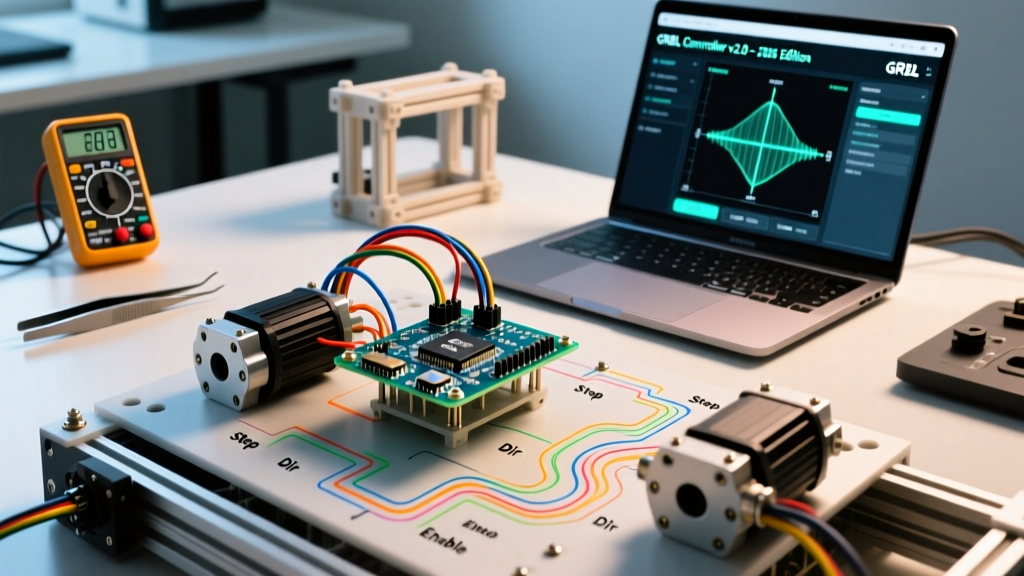
The Arduino Uno cannot directly drive NEMA 23 or NEMA 17 stepper motors. You need a CNC shield. The community consensus heavily favors the Protoneer V3.51 CNC Shield. Priced between $15 and $22 on major electronics marketplaces, it maps the Arduino's I/O pins to four stepper driver sockets, spindle control, and limit switch inputs.
Community Warning on Clone Shields: Many sub-$10 unbranded clones on AliExpress lack the necessary pull-up resistors on the limit switch inputs and feature poorly soldered power terminals that melt under continuous 12V/15A loads. Always verify the board features the Protoneer V3.51 silkscreen or buy from verified community vendors like OpenBuilds.
Stepper Driver Selection: A4988 vs. TMC2209
Your choice of stepper driver dictates machine acoustics and torque delivery. The Protoneer CNC Shield documentation outlines specific jumper configurations required for modern drivers.
- A4988 / DRV8825 ($2 - $4 each): The legacy choice. They are loud, producing a distinct high-pitch whine during idle and movement. They require three microstepping jumpers (MS1, MS2, MS3) installed on the shield to achieve 1/16th microstepping.
- TMC2209 ($5 - $8 each): The modern community favorite. These Ultra-Quiet drivers use StealthChop technology, making the machine nearly silent. Critical Setup Note: To use TMC2209s in standalone step/dir mode on a Protoneer shield, you must remove the MS1 and MS2 jumpers, and leave only the MS3 jumper installed to force 1/16th microstepping. Failing to do this will result in erratic motor stuttering.
Top-Tier GUI Software Recommended by Makers
GRBL requires a host computer to stream G-code via USB. The community has largely abandoned outdated, clunky interfaces in favor of three robust, free, or open-source options in 2026.
1. Universal G-Code Sender (UGS)
UGS is the Java-based workhorse of the community. The 'Platform' version offers a modern, dark-mode UI with real-time 3D toolpath visualization, macro buttons, and a visualizer that color-codes G-code lines as they are executed. It handles large, multi-megabyte 3D carving files without crashing, a common failure point in older software.
2. Candle
For users running older laptops or Raspberry Pi hosts, Candle is a lightweight, C++ based GUI. It lacks the heavy 3D rendering of UGS but provides incredibly reliable serial communication and height-mapping features specifically tailored for PCB milling and laser engraving.
3. OpenBuilds CONTROL
Built specifically with GRBL in mind, this software includes built-in wizards for tramming your spindle, calibrating steps-per-millimeter, and generating basic G-code for tabs and pockets. It is the recommended starting point for absolute beginners entering the OpenBuilds community forums.
Critical Troubleshooting: EMI and Phantom Steps
The most documented, yet misunderstood, failure mode in Arduino GRBL builds is Electromagnetic Interference (EMI) causing 'phantom steps' or sudden USB disconnects mid-job. This is almost exclusively triggered by the spindle router.
The Spindle EMI Fix Framework
Brushed routers, such as the popular Makita RT0701C or generic 300W DC spindles, generate massive electrical noise that couples into the unshielded USB cable and the Arduino's ATmega16U2 serial chip. When GRBL receives corrupted serial data, it triggers an 'Alarm:4' (Soft Limit) or halts entirely to prevent machine damage.
- Physical Separation: Never route your spindle power cable parallel to your stepper motor signal cables. Maintain a minimum 4-inch (10cm) separation, or cross them at strict 90-degree angles.
- USB Shielding: Replace standard USB cables with heavily shielded, double-ferrite USB 2.0 cables. Do not use USB 3.0 cables, as their higher frequency signaling is more susceptible to low-frequency router noise.
- Opto-Isolation: If EMI persists, the community's ultimate fix is upgrading to an Opto-Isolated CNC Shield (approx. $32-$45). These boards use optical isolators to physically break the electrical connection between the Arduino's logic level and the high-current stepper/spindle circuits, rendering the MCU immune to ground-loop noise.
Calibration Specifics: The '$' Settings Matrix
Properly configuring GRBL's EEPROM settings via the `$$` console command is mandatory. Below is a baseline configuration matrix for a standard DIY CNC router utilizing NEMA 23 motors, 1/16th microstepping, and 8mm lead screws (8mm pitch).
| Parameter | Description | Typical Value (8mm Leadscrew) | Community Tuning Advice |
|---|---|---|---|
$100, $101, $102 |
Steps per millimeter (X, Y, Z) | 200.000 | Formula: (Motor Steps * Microsteps) / Screw Pitch. (200 * 16) / 8 = 400. Wait, for 1/16 it is 400. If using 1/8 microstep, it is 200. |
$110, $111, $112 |
Max rate, mm/min | 4000.000 | Start low (1000) and increase by 500 until motors stall, then reduce by 20%. |
$130, $131, $132 |
Acceleration, mm/sec^2 | 300.000 | Heavy gantries require lower acceleration (150-200) to prevent skipped steps. |
$11 |
Junction deviation, mm | 0.010 | Keep at 0.010 for 3D carving. Increase to 0.050 for faster, rough 2D profile cuts. |
Must-Bookmark Community Hubs
To stay current with GRBL macros, post-processor updates for Fusion 360 and FreeCAD, and hardware modifications, rely on these verified community hubs:
- The GRBL GitHub Wiki: The definitive source for compiling custom firmware and understanding the exact G-code dialect supported by v1.1.
- OpenBuilds Forums: The largest active repository of build logs, CAD files, and real-world troubleshooting threads for GRBL-based machines.
- CNC Kitchen (YouTube & Patreon): While heavily focused on 3D printing, their deep-dives into stepper motor torque curves and TMC driver tuning are directly applicable to GRBL CNC builds.
By leveraging these community-vetted resources, specific hardware configurations, and EMI mitigation strategies, your Arduino GRBL machine will transition from a finicky prototype to a reliable, production-capable manufacturing tool.