
The RP2040 vs RP2350 Divide: Choosing Your Silicon
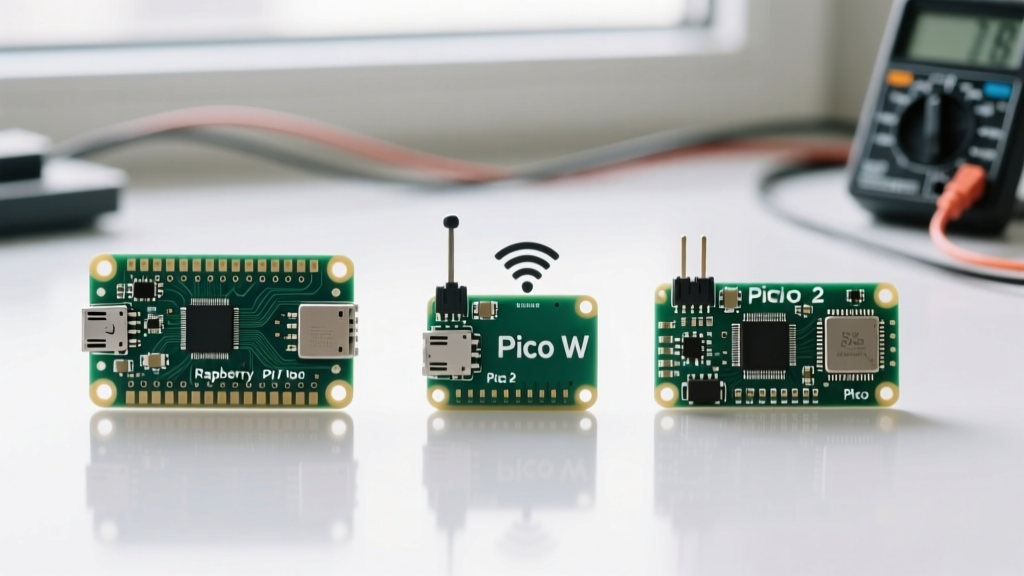
When engineers and makers begin scoping out Raspberry Pi Pico projects, the initial assumption is often that any board bearing the "Pico" name will suffice. However, the evolution from the original RP2040 to the wireless-enabled Pico W, and now the RP2350-based Pico 2, has fractured the ecosystem into highly specialized hardware tiers. Selecting the wrong board for your specific application doesn't just result in suboptimal performance; it can lead to catastrophic memory faults, brownout resets, and abandoned prototypes.
According to the official Raspberry Pi microcontroller documentation, the architectural leap from the RP2040 to the RP2350 is not merely a bump in clock speed. It represents a fundamental shift in memory management, security, and peripheral routing. Before diving into specific project architectures, we must establish the baseline silicon specifications.
| Feature | Pico (RP2040) | Pico W (RP2040) | Pico 2 (RP2350) |
|---|---|---|---|
| Core Architecture | Dual Arm Cortex-M0+ @ 133MHz | Dual Arm Cortex-M0+ @ 133MHz | Dual Arm Cortex-M33 / RISC-V @ 150MHz |
| SRAM | 264 KB | 264 KB | 520 KB |
| Flash | 2 MB | 2 MB | 4 MB |
| Connectivity | None | Wi-Fi 4 / Bluetooth 5.2 (CYW43439) | None (Base) / W variant available |
| PIO State Machines | 8 (2 blocks of 4) | 8 (2 blocks of 4) | 12 (3 blocks of 4) |
| Typical Price | $4.00 | $6.00 | $5.00 |
Project Tier 1: Battery-Powered Environmental Logging
For remote environmental monitoring—such as agricultural soil moisture tracking or off-grid weather stations—power consumption is the ultimate bottleneck. The original Pico (RP2040) is notoriously difficult to put into a true deep sleep. While the RP2040 datasheet outlines a "Dormant" mode, achieving it requires halting all system clocks and relying on an external GPIO interrupt or an external Real-Time Clock (RTC) to wake the chip. In practice, a poorly optimized RP2040 dormant circuit still draws between 1.3mA and 2mA due to onboard voltage regulator quiescent current and flash memory standby states.
The Pico 2 Advantage: The RP2350 introduces a dedicated, always-on RTC and refined sleep states (SLEEP and DORMANT). By utilizing the RP2350's internal RTC alarm to trigger a wake-up sequence, you can eliminate the external I2C RTC module entirely. Furthermore, the RP2350 allows developers to gate power to specific SRAM banks, reducing active leakage. For a project requiring a 3-year battery life on a standard Li-SOCl2 cell, the Pico 2 is the undisputed winner, capable of achieving system-level sleep currents in the low microamp range when paired with a high-efficiency external buck-boost regulator.
Project Tier 2: Wi-Fi Enabled Smart Home Actuators
IoT actuators, such as MQTT-controlled relays or smart blinds, require wireless connectivity. This is the exclusive domain of the Pico W. The Pico W integrates the Infineon CYW43439 Wi-Fi/BT chip, which communicates with the RP2040 via a dedicated SPI bus. However, building reliable IoT projects on the Pico W requires navigating severe memory and power constraints.
The TLS Handshake Bottleneck
When writing MicroPython firmware for secure MQTT (TLS 1.2/1.3), the cryptographic handshake requires substantial RAM allocation. The RP2040's 264KB of SRAM is shared between your application, the MicroPython heap, and the CYW43439 Wi-Fi driver buffers. It is incredibly common for developers to encounter a MemoryError during the TLS handshake when connecting to cloud brokers like AWS IoT or HiveMQ.
Pro-Tip for Pico W IoT: If you must use TLS on the RP2040, manually trigger garbage collection (
gc.collect()) immediately before initializing the SSL socket, and avoid loading large JSON payloads into memory simultaneously. For heavy edge-computing IoT, wait for the Pico 2 W, where the 520KB SRAM completely eliminates this bottleneck.
Project Tier 3: High-Speed Signal Generation & Robotics
Robotics and audio/signal generation projects rely heavily on the Pico's Programmable I/O (PIO). The original RP2040 features 8 state machines, which is usually sufficient for driving WS2812B LEDs, reading quadrature encoders, and generating basic I2S audio simultaneously. However, complex robotic platforms requiring multiple high-resolution motor encoders, CAN bus emulation, and lidar interfacing quickly exhaust the 8 available state machines.
The RP2350 PIO Expansion: The Pico 2 features 12 PIO state machines across 3 blocks. More importantly, it introduces the HSTX (High-Speed Serial Transmit) peripheral. In RP2040 projects, outputting DVI/HDMI video or high-speed DAC signals required dedicating multiple PIO state machines and consuming massive amounts of CPU cycles to feed them. The HSTX peripheral on the Pico 2 handles high-speed serial data transmission natively in hardware, freeing up the PIO blocks and CPU cores for complex kinematic calculations and inverse kinematics solvers.
Common Silicon Failure Modes & Mitigation
Hardware selection is only half the battle; understanding how these boards fail in real-world environments separates amateur builds from professional deployments. Below are the most common failure modes encountered in Raspberry Pi Pico projects and their hardware-level mitigations.
- Pico W Wi-Fi Brownouts: When the CYW43439 chip transmits data, it can draw current spikes of up to 150mA-300mA. If your project is powered via a low-quality Micro-USB cable or a weak USB hub, the voltage drop across the cable resistance will cause the onboard RT6185 buck-boost converter to hit its Under-Voltage Lockout (UVLO) threshold. The Pico W will randomly reset. Mitigation: Solder a 470µF low-ESR capacitor directly across the VSYS and GND pins on the Pico W header to absorb RF transmission spikes.
- RP2040 Flash Wear: Many data-logging projects mistakenly write sensor readings directly to the onboard 2MB SPI flash via the LittleFS filesystem. SPI NOR flash has a limited erase-cycle lifespan (typically 100,000 cycles). Writing a log file every minute will destroy the flash chip in under 3 months. Mitigation: Buffer data in SRAM and write to flash in large, infrequent blocks, or offload logging to an external I2C EEPROM or SD card.
- MicroPython Heap Fragmentation: Long-running Pico projects written in MicroPython often suffer from heap fragmentation, leading to allocation failures after days of uptime. Mitigation: Pre-allocate all buffers and arrays during the
main()initialization phase, and reuse these memory spaces rather than creating new objects inside your main loop.
Development Environment: C/C++ SDK vs MicroPython
Your choice of board is deeply intertwined with your chosen firmware environment. The MicroPython quick reference for RP2 highlights the ease of use for rapid prototyping, but it abstracts away the direct memory access (DMA) and tight interrupt handling required for precision motor control.
If your project involves high-frequency PID control loops (e.g., balancing robots or drone flight controllers), you must use the C/C++ Pico SDK. The RP2350 (Pico 2) introduces a new security and memory management architecture that requires an updated SDK toolchain. Developers migrating from RP2040 to RP2350 will need to ensure their CMake configurations are updated to target the pico2 platform, and they must account for the new bootrom security features if utilizing external QSPI flash.
The Final Verdict: Mapping Projects to Boards
There is no universal "best" board; there is only the right tool for the specific constraints of your project.
- Choose the Original Pico ($4): For educational kits, basic USB HID devices, simple LED matrices, and projects where absolute minimum cost is the primary driver and power consumption is irrelevant.
- Choose the Pico W ($6): For smart home sensors, MQTT telemetry nodes, and web-server-based dashboards. Be prepared to manage power spikes and MicroPython memory limitations.
- Choose the Pico 2 ($5): For battery-powered remote loggers, complex robotics, audio processing, and any project requiring heavy edge-computing or native TLS encryption without memory panics.
By aligning your project's core requirements—be it SRAM capacity, sleep-state efficiency, or wireless telemetry—with the specific silicon architecture of the Pico lineup, you eliminate hardware-induced bottlenecks and ensure a robust, production-ready deployment.