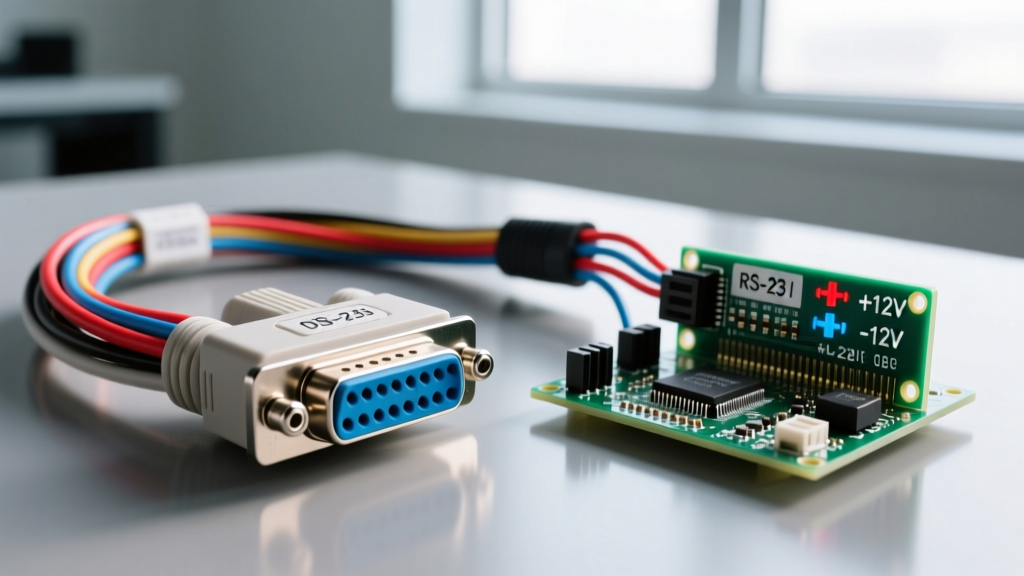

RS-232 wiring is a physical layer standard for serial communication that transmits data using bipolar voltage swings (typically ±5V to ±15V) rather than the unipolar 0V-to-5V logic levels used by modern microcontrollers. When you introduce RS-232 into a real circuit, it fundamentally changes the hardware requirements: you can no longer wire a microcontroller's UART pins directly to the communication line. Instead, you must insert a charge-pump level shifter to translate the low-voltage TTL/CMOS logic (0V/3.3V) into the high-voltage bipolar signals (±12V) that the standard demands. Because of this voltage difference, beginners most commonly confuse RS-232 with raw TTL serial (which is just 0V and 5V/3.3V) or RS-485 (which uses differential signaling over twisted pairs for multi-drop networks). Plugging a raw RS-232 transmit line into an ESP32 or Raspberry Pi Pico GPIO pin will instantly fry the microcontroller's input protection diodes.
The Math Behind the Signal: Voltage Thresholds and Cable Limits
To wire RS-232 correctly, you have to understand what the receiver is actually looking for. The TIA/EIA-232-F standard defines strict voltage thresholds for valid logic states, measured at the receiver's input pins with a 3kΩ to 7kΩ load.
- Logic 0 (Space): +3V to +15V (Typically driven at +12V)
- Logic 1 (Mark): -3V to -15V (Typically driven at -12V)
- Deadband (Invalid): -3V to +3V (Receivers must ignore signals in this zone to reject noise)
The ±3V deadband is the secret to RS-232's legendary noise immunity on the bench and in industrial panels. But this high-voltage swing comes with a strict physical limitation: cable capacitance. The standard mandates that the total capacitive load on the driver must not exceed 2500 pF.
Worked Numeric Example: Calculating Maximum Cable Length
Let's say you are wiring a legacy CNC router controller to a PC using Belden 9501, a standard 3-conductor shielded RS-232 cable. Belden 9501 has a nominal conductor-to-conductor capacitance of roughly 34 pF per foot.
To find your absolute maximum cable run before signal degradation causes framing errors:
- Identify max load: 2500 pF
- Identify cable capacitance: 34 pF/ft
- Divide: 2500 pF / 34 pF/ft = 73.5 feet
If you run 100 feet of this cable at 115,200 baud, the capacitance will round off the sharp square-wave edges of your serial data. The receiver will misinterpret the rounded edges, resulting in a corrupted data stream. If you need a 150-foot run, you must either drop the baud rate (e.g., to 9600 baud, where edge rounding matters less) or switch to an RS-422/RS-485 differential driver.
Where You Meet RS-232 in Practice
While USB and Ethernet dominate consumer tech, RS-232 remains deeply embedded in infrastructure, home automation, and industrial control. Here is where you will actually need to crimp a DB9 connector in the field:
- Legacy Solar and Battery Inverters: Older OutBack Power MateMate systems and early Victron Color Control GX units use RS-232 for local configuration and firmware flashing via a DB9 port.
- Enterprise UPS Management: APC Smart-UPS and Eaton network management cards still feature RS-232 serial ports for out-of-band console access when the network stack is completely dead.
- HVAC Control Boards: While many modern thermostats use RS-485 or proprietary bus protocols, older Carrier and Bryant Infinity control boards utilize physical layers that mimic RS-232 voltage swings for technician diagnostics.
- CNC and Plasma Cutters: Mach3 legacy setups and older plasma torch height controllers rely on RS-232 for real-time G-code streaming where USB latency is unacceptable.
Pinouts and Physical Wiring: The DB9 Standard
The physical connector for RS-232 is almost universally the DE-9 (commonly, though incorrectly, called DB9). For 95% of DIY and home automation wiring, you only need to care about three pins. This is known as '3-wire RS-232'.
| DB9 Pin | Signal Name | Direction (DTE/PC) | Direction (DCE/Device) |
|---|---|---|---|
| 2 | RD (Receive Data) | Input | Output |
| 3 | TD (Transmit Data) | Output | Input |
| 5 | SG (Signal Ground) | Common | Common |
The Null Modem Trap: The most common mistake in RS-232 wiring is connecting two DTE (Data Terminal Equipment) devices together—like wiring a PC to a Raspberry Pi acting as a serial console. If you use a 'straight-through' cable, Pin 2 (Rx) connects to Pin 2 (Rx), and nothing happens. You must use a Null Modem cable, which crosses Pin 2 to Pin 3, and Pin 3 to Pin 2, while keeping Pin 5 straight. Always verify your cable with a multimeter's continuity beep test before applying power.
The Decision Tree: Choosing Your Cable, Connector, and Shifter
Stop guessing which modules to buy. Use this decision path to select the exact components for your workbench or installation.
| Condition / Scenario | Action Required | Concrete Pick / Part Number |
|---|---|---|
| Interfacing a 5V Arduino Mega to a legacy DB9 device. | Use a standard 5V level shifter with 10V charge pump caps. | Texas Instruments MAX232 IC or SparkFun PRT-00449. |
| Interfacing a 3.3V ESP32 or Pi Pico to a legacy DB9 device. | Use a 3.3V specific level shifter. A 5V MAX232 will output voltages that exceed the ESP32's absolute maximum ratings. | Texas Instruments MAX3232EIPW with 0.1µF (100nF) X7R ceramic charge pump capacitors. |
| Wiring a run under 50 feet in a standard indoor environment. | Use standard 3-conductor shielded cable. Foil shield is sufficient. | Belden 9501 (24 AWG, 3-conductor, foil shield, drain wire). |
| Wiring a run over 100 feet or through a noisy VFD/motor panel. | Abandon RS-232. The capacitance and EMI will corrupt the single-ended signals. | Convert to RS-485 using MAX485 transceivers and Belden 9841 twisted pair. |
The Default Recommendation: If you are building a custom serial bridge for a modern home automation panel in 2026, do not wire raw DB9 pins to your microcontroller. Buy a pre-assembled RS-232 shifter board that includes the MAX3232 and the required surface-mount charge pump capacitors. It saves you from the inevitable breadboard noise issues that plague hand-wired charge pumps.
Frequently Asked Questions
Can I use standard CAT5e Ethernet cable for RS-232 wiring?
Yes, but with caveats. CAT5e has a capacitance of roughly 14 pF to 17 pF per 100 feet (much lower than standard serial cable), which is excellent for signal integrity. However, it is unshielded (UTP). If you are running it next to 120V AC mains or variable frequency drives, the lack of a foil shield will induce noise. If you use CAT5e, twist the unused wires together and tie them to Signal Ground (Pin 5) at one end only to act as a makeshift drain.
Why does my RS-232 device require pins 4, 6, 7, and 8 to be jumpered?
Those pins control hardware flow control (RTS, CTS, DTR, DSR). Many legacy devices, particularly older UPS units and industrial PLCs, will refuse to transmit data unless they see the 'Data Set Ready' (DSR) and 'Clear to Send' (CTS) lines asserted. If your device uses 3-wire RS-232 but demands flow control signals, you must loop back Pin 4 to Pin 6, and Pin 7 to Pin 8 at the device's DB9 connector to 'trick' it into thinking a modem is connected. You can find exact loopback diagrams in the TI MAX3232 datasheet application notes.
Is RS-232 the same as the serial port on my Arduino?
No. The Arduino's TX and RX pins output TTL serial (0V for logic 0, 5V for logic 1). RS-232 outputs bipolar serial (+12V for logic 0, -12V for logic 1). They share the same UART protocol (baud rate, start/stop bits, parity), but the physical voltage layers are completely incompatible. You must always use a level shifter between them.