
The Evolution of u-blox Modules in Maker Projects
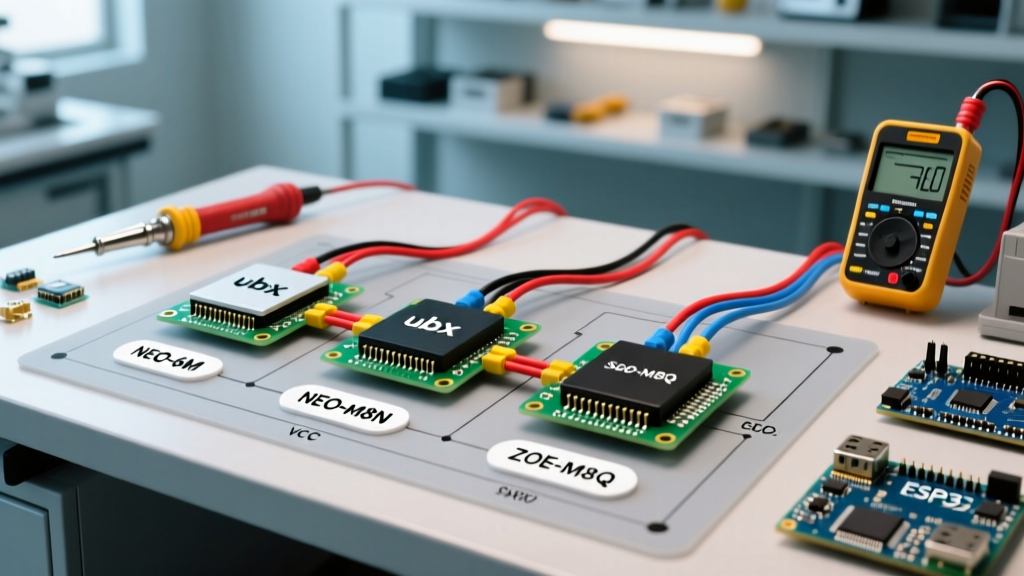
When integrating location tracking into microcontroller projects, the Arduino GPS module ecosystem is overwhelmingly dominated by u-blox chipsets. However, the transition from legacy generation 6 chips to modern generation 8, 9, and 10 architectures has introduced significant compatibility hurdles regarding logic levels, communication protocols, and library support. In 2026, relying on outdated NEO-6M tutorials for a modern NEO-M8N or MAX-M10S board is a primary cause of project failure.
This compatibility guide dissects the hardware wiring, protocol nuances, and software ecosystems of the most common u-blox-based modules, ensuring your MCU communicates reliably with the satellite constellation.
Core Arduino GPS Module Compatibility Matrix
Before wiring your microcontroller, you must identify the exact chipset on your breakout board. The market is flooded with generic PCBs, but the silicon underneath dictates your compatibility constraints.
| Module / Chipset | Generation | Interfaces | Default Baud | 5V Logic Tolerance | Avg. Price (2026) |
|---|---|---|---|---|---|
| NEO-6M (Genuine/Clone) | Gen 6 | UART only | 9600 | No (3.3V chip, 5V LDO on clones) | $4.00 - $8.00 |
| NEO-M8N | Gen 8 | UART, I2C (DDC), SPI | 9600 / 38400 | No (Strict 3.3V) | $15.00 - $25.00 |
| ZOE-M8Q | Gen 8 | UART, I2C (DDC) | 9600 | No (Strict 3.3V) | $20.00 - $30.00 |
| MAX-M10S | Gen 10 | UART, I2C, SPI | 38400 | No (Strict 3.3V) | $25.00 - $40.00 |
Hardware Wiring & Logic Level Pitfalls
The most catastrophic failure mode when connecting an Arduino GPS module to a classic 5V AVR board (like the Arduino Uno or Mega) is logic level mismatching. While the u-blox chips operate strictly at 3.3V, many cheap NEO-6M breakout boards include an onboard 5V-to-3.3V LDO regulator and a logic level shifter on the RX line. Do not assume this protection exists on M8, M9, or M10 breakouts.
⚠️ CRITICAL WARNING: Feeding 5V from an Arduino Uno's TX pin directly into the RX pin of a genuine NEO-M8N or MAX-M10S will permanently damage the module's UART transceiver within milliseconds. Always use a bidirectional logic level shifter (e.g., BSS138 MOSFET-based shifters) or a dedicated 3.3V MCU like the ESP32 or Arduino Nano 33 IoT.UART Pin Mapping for Common MCUs
- Arduino Uno (ATmega328P): Use
SoftwareSerialon pins D3 (RX) and D4 (TX). Constraint: SoftwareSerial cannot reliably parse NMEA sentences at 115200 baud on a 16MHz clock. You must configure the GPS module to output at 9600 baud. - Arduino Mega 2560: Use Hardware Serial1 (Pins 18/19), Serial2 (16/17), or Serial3 (14/15). Hardware UART handles 115200 baud effortlessly.
- ESP32 (DevKit V1): Use UART2 (GPIO 16 for RX, GPIO 17 for TX). The ESP32 natively operates at 3.3V, eliminating the need for level shifters and making it the ideal companion for modern u-blox modules.
Protocol Compatibility: UART vs. I2C (DDC)
Legacy NEO-6M modules only support UART (NMEA output). Modern modules like the NEO-M8N series support I2C, which u-blox refers to as DDC (Display Data Channel). Transitioning to I2C offers massive architectural advantages for complex MCU projects.
Why Choose I2C over UART?
- Pin Conservation: I2C only requires two shared pins (SDA/SCL), allowing you to daisy-chain multiple sensors without exhausting hardware UART ports.
- Buffer Overrun Prevention: UART requires the MCU to read bytes exactly as they arrive. If your Arduino is busy driving a Neopixel strip or writing to an SD card, the UART buffer overflows, corrupting NMEA sentences. I2C acts as a master-slave polled system; the GPS module safely buffers the data internally until the MCU requests it.
- Default Addressing: The default I2C address for almost all u-blox M8/M9/M10 modules is
0x42(7-bit). Ensure your pull-up resistors are 4.7kΩ to 3.3V.
Software & Library Compatibility (2026 Landscape)
Selecting the correct parsing library is just as critical as the hardware wiring. The Arduino ecosystem offers three primary paths for GPS data extraction.
1. TinyGPS++ (Best for AVR / NMEA Parsing)
Mikal Hart's TinyGPS++ remains the gold standard for memory-constrained boards like the Arduino Uno. It parses standard NMEA-0183 sentences (GGA, RMC) with a minimal RAM footprint. However, it is read-only. You cannot use TinyGPS++ to change the module's baud rate, update rate, or enable specific constellations (Galileo, BeiDou).
2. SparkFun u-blox GNSS Library (Best for M8/M9/M10 Configuration)
For modern modules, the SparkFun u-blox GNSS Arduino Library is mandatory. Instead of relying solely on text-based NMEA sentences, this library utilizes the binary UBX protocol over I2C or UART. This allows you to:
- Query the module's firmware version and health status.
- Enable multi-constellation tracking (GPS + GLONASS + Galileo simultaneously).
- Configure the navigation engine for specific use cases (e.g., high-altitude ballooning, automotive, or pedestrian).
- Save configuration settings to the module's Battery-Backed RAM (BBR) or Flash so they persist across power cycles.
3. MicroNMEA (Best for Ultra-Low Latency)
If you are building a drone flight controller or a high-speed data logger where every millisecond of parsing latency matters, MicroNMEA provides a non-blocking, zero-allocation parsing engine. It sacrifices ease-of-use for raw execution speed on 32-bit ARM Cortex-M MCUs.
Real-World Failure Modes & Edge Cases
Even with perfect wiring and library selection, environmental and hardware edge cases frequently stall GPS lock. Be prepared to troubleshoot the following scenarios:
The "Indoor Window" Trap
Ceramic patch antennas (typically 18x18mm or 25x25mm) require a direct, unobstructed view of the sky. Modern Low Noise Amplifiers (LNAs) on breakout boards are highly sensitive, but standard dual-pane Low-E glass attenuates RF signals by up to 40dB. Actionable fix: Always perform your initial "cold start" test outdoors. A cold start (downloading the almanac and ephemeris data from scratch) can take up to 15 minutes on a NEO-6M, but only 26 seconds on a MAX-M10S.
Antenna Impedance Mismatch
u-blox modules are tuned for a 50-ohm impedance path. If you attempt to extend the antenna cable using standard copper wire or non-RG178 coaxial cable, you will introduce signal reflection (VSWR mismatch), effectively deafening the receiver. Always use matched 50-ohm U.FL to SMA pigtails, and keep the cable length under 15cm unless you are using an active antenna with an integrated LNA at the antenna element.
The Clone Chip Baud Rate Roulette
Cheap $4 modules from online marketplaces often do not contain genuine u-blox silicon. They may use clone chipsets (like the ATGM336H or various unmarked SoCs) that mimic the NEO-6M pinout but default to 115200 baud or output non-standard NMEA sentences. If TinyGPS++ returns no data, use a basic serial passthrough sketch to dump raw bytes to the Arduino IDE Serial Monitor at 115200 baud to identify the true default configuration.
Final Verdict: Which Module Should You Choose?
Your project requirements dictate the optimal hardware selection:
- Choose the NEO-6M if: You are on a strict sub-$10 budget, building a basic vehicle tracker, and using an ESP32 where 5V logic and hardware UART limitations are not an issue.
- Choose the NEO-M8N if: You need reliable multi-constellation support (crucial for urban canyons with tall buildings) and want to utilize I2C to save MCU pins.
- Choose the MAX-M10S if: You are designing a commercial product or high-altitude balloon requiring ultra-low power consumption (under 15mA in tracking mode) and concurrent reception of four GNSS constellations.
By matching your MCU's logic levels to the module's requirements and leveraging the UBX protocol via modern libraries, you will bypass the most common pitfalls of Arduino GPS integration and achieve rapid, reliable satellite locks.