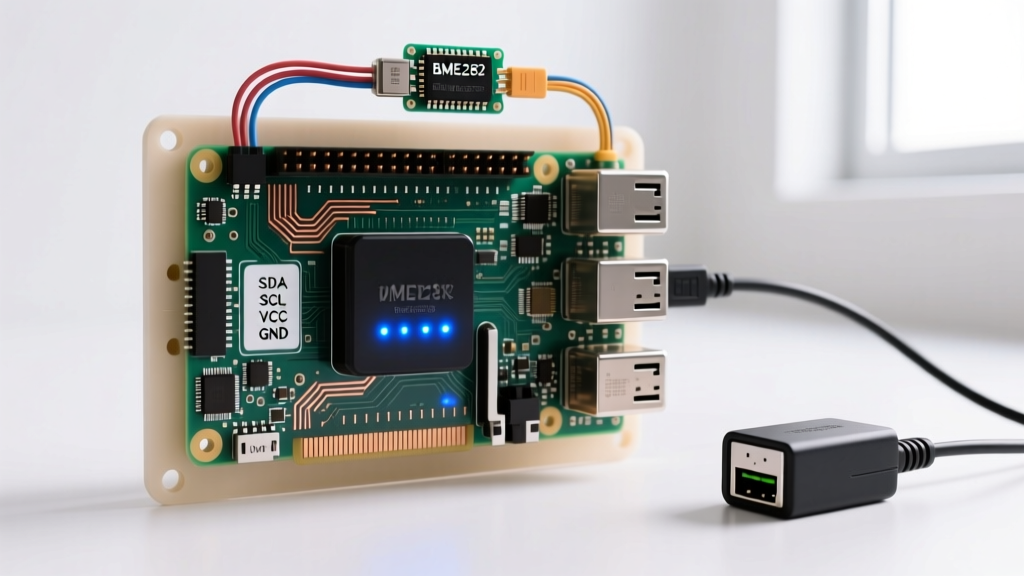
When makers talk about bluetooth in raspberry pi systems, they usually treat it as a black-box wireless feature you simply turn on via bluetoothctl. But under the hood of a Raspberry Pi 4B, Pi 5, or Compute Module 5, Bluetooth is not magic—it is a discrete RF transceiver (typically the Infineon/Cypress CYW43455) communicating with the main Broadcom SoC over a high-speed internal UART bus using the Host Controller Interface (HCI) protocol. Understanding this physical and transport layer is the difference between a reliable IoT node and a bench full of frustration.
The Physical Layer: HCI UART and RF Bus Mechanics
Before writing a single line of Python, you must understand how the data actually moves. The Pi does not have a native Bluetooth baseband processor inside the main CPU. Instead, the SoC talks to the wireless chip via an internal UART bus. If you are adding an external Bluetooth module (like an HC-05 or an ESP32 acting as a BLE bridge) to the Pi's GPIO header, you are dealing with standard serial wiring constraints.
| Protocol Layer | Physical Wires / Medium | Max Speed | Addressing Scheme | Max Distance |
|---|---|---|---|---|
| Internal HCI UART (SoC to BT Chip) | 4 wires (TX, RX, CTS, RTS) | 3 Mbps | N/A (Point-to-Point) | < 50mm (PCB trace) |
| Bluetooth Low Energy (BLE 5.0) RF | 2.4 GHz Antenna / PCB Trace | 2 Mbps | 48-bit MAC / 128-bit UUID | ~40m (Line of sight) |
| Bluetooth Classic (BR/EDR) RF | 2.4 GHz Antenna / PCB Trace | 3 Mbps | 48-bit MAC (BD_ADDR) | ~10m (Class 2 radio) |
| External I2C BT Bridge (e.g., NXP) | 4 wires (SDA, SCL, VCC, GND) | 400 kHz (Fast Mode) | 7-bit I2C Address | < 1m (wired bus) |
When wiring external UART-based Bluetooth modules to the Pi's GPIO, pull-up resistors are critical. The Pi's internal pull-ups on the UART RX line are often too weak (typically 50kΩ) to reject EMI from nearby switching power supplies. Adding an external 10kΩ pull-up to 3.3V on the RX line prevents 'ghost' bytes that will corrupt the HCI initialization sequence.
Classic Failures: Baud Mismatches, MAC Clashes, and Ghost Bytes
If your Bluetooth service fails to start, or hciconfig shows the interface as DOWN, you are likely hitting one of three classic physical/transport layer failures.
1. The HCI Baud Rate Mismatch
On boot, the hciuart systemd service initializes the internal UART at a safe 115,200 baud. It then sends a vendor-specific HCI command to the CYW43455 chip to bump the speed to 3,000,000 baud. If the firmware blob (brcmfmac) fails to load from /lib/firmware/brcm/, the chip stays at 115,200 baud while the Pi's SoC switches to 3M baud. The result is a garbled bus and a command tx timeout in dmesg. Fix: Ensure your raspi-firmware package is fully updated and that dtoverlay=disable-bt is not lingering in /boot/firmware/config.txt.
2. The AA:AA:AA:AA:AA:AA Address Clash
A notorious issue in the Pi 4 and Pi 5 ecosystem is the default BD_ADDR bug. The Bluetooth chip is supposed to read its unique MAC address from an onboard EEPROM or OTP memory during initialization. If the I2C/SDIO read to that memory fails or times out, the chip falls back to a generic default address: AA:AA:AA:AA:AA:AA. If you deploy multiple Pis in a factory or home automation setup, this address clash will cause massive packet collisions and silent connection drops. Fix: Use the bdaddr utility from the bluez-utils package to manually burn a unique MAC into the chip's volatile memory on boot via a systemd script, or set bdaddr=XX:XX:XX:XX:XX:XX in your boot configuration.
3. Missing Pull-Ups on External Modules
If you are using an external UART Bluetooth module (like an HM-10 BLE bridge) wired to the Pi's GPIO, a floating RX pin will pick up ambient 2.4GHz RF noise and inject garbage into the Linux serial buffer. This manifests as random hci0: hardware error 0x00 events. Always verify your physical wiring with a multimeter and ensure a 10kΩ pull-up is present on the module's TX line driving the Pi's RX pin.
Sniffing the Bus and Modern Python BLE Exchange
Forget hcidump; it is largely deprecated in modern BlueZ stacks. The 2026 standard for sniffing Bluetooth HCI traffic on Linux is btmon. It taps directly into the kernel's HCI monitor socket, showing you the exact byte-level negotiation between the Pi and the RF chip.
To capture a trace of a failing connection, run:
sudo btmon -w /tmp/hci_trace.pcapOpen the resulting .pcap file in Wireshark. You can filter by bthci_cmd to see exactly which HCI commands the Pi is sending, and bthci_evt to see if the chip is returning a 'Command Disallowed' (0x0C) or 'Unknown Connection Identifier' (0x02) error code.
Minimal Working BLE Exchange (Python)
For application-level code, the legacy PyBluez library is dead. The modern, asynchronous standard for Bluetooth in Raspberry Pi environments is Bleak (Bluetooth Low Energy platform Agnostic Klient). Below is a minimal, robust script to scan for a BLE sensor and read a specific GATT characteristic.
import asyncio
from bleak import BleakClient, BleakScanner

# Target device name and the specific GATT UUID for the sensor data
TARGET_NAME = 'ESP32_BME280_Sensor'
CHAR_UUID = '00002a6e-0000-1000-8000-00805f9b34fb' # Standard Temperature UUID

async def read_ble_sensor():
    print('Scanning for BLE devices...')
    device = await BleakScanner.find_device_by_filter(
        lambda d, ad: d.name and TARGET_NAME in d.name, timeout=10.0
    )

    if not device:
        print(f'Error: {TARGET_NAME} not found. Check antenna wiring and power.')
        return

    async with BleakClient(device.address) as client:
        if not client.is_connected:
            print('Failed to establish HCI link.')
            return

        # Read the raw bytes from the GATT characteristic
        raw_data = await client.read_gatt_char(CHAR_UUID)
        # Convert little-endian 16-bit int to Celsius (per BLE spec)
        temp_raw = int.from_bytes(raw_data, byteorder='little', signed=True)
        temperature = temp_raw / 100.0

        print(f'Connected to {device.address}')
        print(f'Temperature: {temperature:.2f} °C')

if __name__ == '__main__':
    asyncio.run(read_ble_sensor())
Protocol Selection: Distance, Speed, and Device Count
Which protocol actually fits your project? Bluetooth is not a universal hammer. Use this decision matrix to choose the right transport for your embedded architecture.
| Criteria | BLE 5.0 (Pi Onboard) | Classic BT (A2DP/SPP) | ESP-NOW (2.4GHz Proprietary) | Wired RS-485 |
|---|---|---|---|---|
| Best For | Low-power sensors, beacons | Audio streaming, legacy serial | High-speed mesh, RC telemetry | Industrial noise, long runs |
| Max Speed | 2 Mbps | 3 Mbps | ~20 Mbps (theoretical) | 10 Mbps (short distance) |
| Device Count | Up to 20 per Pi (practical) | 7 active piconet slaves | 20 nodes (broadcast limit) | 32 to 256 nodes (addressable) |
| Reliable Distance | 10m - 40m (indoor) | 10m (indoor) | 50m - 200m (outdoor) | 1200m (wired) |
| Latency | 6ms - 50ms | 20ms - 100ms | < 5ms | < 1ms |
Choose BLE when you need to connect the Pi to battery-powered microcontrollers (like an Arduino Nano 33 BLE) where sleep currents must remain under 10µA. Choose RS-485 when running cables through a noisy garage or factory floor where 2.4GHz RF multipath fading will destroy Bluetooth packet integrity.
Frequently Asked Questions
Why is my Raspberry Pi Bluetooth stuck on AA:AA:AA:AA:AA:AA?
This happens when the Pi's bootloader or the brcmfmac driver fails to read the unique MAC address from the wireless chip's OTP (One-Time Programmable) memory or external EEPROM during the early boot sequence. It defaults to a generic address. Fix this by ensuring your firmware is up to date via sudo apt update && sudo apt install raspi-firmware, or manually assign a static MAC using the bdaddr tool from the bluez-utils package and triggering it via a systemd service on boot.
How do I fix the 'hci0: command tx timeout' error in dmesg?
This error almost always indicates a baud rate mismatch on the internal HCI UART bus. The Pi SoC is trying to talk at 3,000,000 baud, but the Bluetooth chip is stuck at the default 115,200 baud because the firmware patch RAM failed to load. Check dmesg for missing .hcd firmware files in /lib/firmware/brcm/. Reinstalling the raspi-firmware package and rebooting usually resolves the missing patch file.
Can I use the Raspberry Pi's internal Bluetooth and an external USB Bluetooth dongle simultaneously?
Yes, but it requires careful interface management. The internal chip will enumerate as hci0 and the USB dongle as hci1. You must explicitly tell BlueZ which adapter to use for specific tasks. In bluetoothctl, use the select <MAC_of_hci1> command before scanning. In Python (using Bleak), you can specify the adapter by passing the adapter='hci1' argument to the BleakScanner or BleakClient initialization.
What is the maximum reliable distance for Raspberry Pi BLE in a typical home?
With the onboard PCB trace antenna and no external amplification, expect a reliable connection distance of about 10 to 15 meters through standard drywall. If you are building a gateway that needs to reach sensors in a detached garage or across a large property, you should disable the internal BT (dtoverlay=disable-bt) and use a USB Bluetooth 5.0 adapter with an external RP-SMA antenna connector, which can push reliable BLE range past 50 meters line-of-sight.