
The Evolution of Color Detection in DIY Electronics
Integrating color detection into embedded systems has transitioned from a niche industrial requirement to a staple in modern maker projects. Whether you are building an automated Lego sorting machine, a smart hydroponics nutrient analyzer, or an ambient lighting synchronizer, selecting the correct RGB sensor is critical to your project's success. In 2026, the market is saturated with cheap clones and advanced spectral ICs, making it difficult to separate reliable hardware from e-waste.
This comprehensive buying guide cuts through the marketing jargon. We will dissect the underlying architectures of the most popular color sensor ICs, evaluate their real-world failure modes, and provide a definitive decision framework for Arduino, ESP32, and Raspberry Pi developers.
Core Architectures: How RGB Sensors Actually Work
At a fundamental level, an RGB sensor consists of an array of silicon photodiodes covered by optical interference filters. These filters isolate specific wavelengths of light: typically Red (approx. 610nm), Green (540nm), and Blue (460nm). However, raw photodiode data is rarely useful without processing.
Analog vs. Frequency vs. Digital I2C Output
- Analog Output: Older or highly specialized sensors output raw voltage. These require an external ADC (Analog-to-Digital Converter) and are highly susceptible to voltage noise over long wire runs.
- Frequency/PWM Output: The sensor contains an internal current-to-frequency oscillator. The microcontroller reads the color by measuring the period of the square wave using hardware interrupts. This is highly resistant to noise but consumes multiple GPIO pins.
- Digital I2C Output: The modern standard. The IC features an onboard ADC (often 16-bit) and an I2C state machine. It handles integration timing, gain scaling, and IR filtering internally, presenting clean digital registers to your microcontroller.
The Big Four: Comparing the Most Popular RGB Sensor ICs
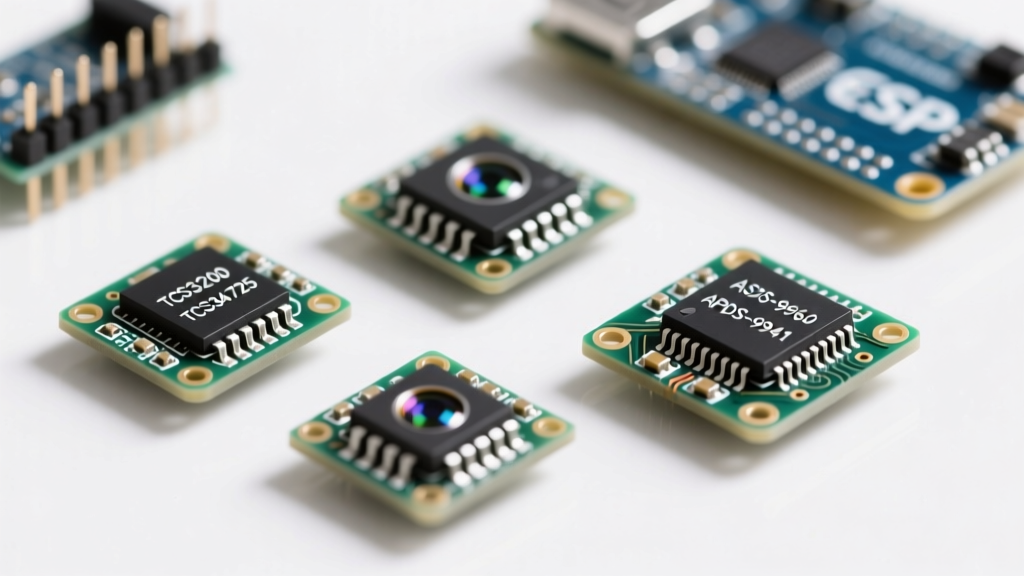
When shopping on Adafruit, SparkFun, or direct from component suppliers, you will encounter four dominant IC families. Below is a technical comparison to guide your purchase.
| IC Model | Interface | Resolution | IR Filter | Best Use Case | Avg Price |
|---|---|---|---|---|---|
| TCS3200 | Freq/PWM | 12-bit (eff.) | No | Basic sorting, educational kits | $3 - $5 |
| TCS34725 | I2C | 16-bit | Yes | Accurate color matching, LED control | $5 - $8 |
| APDS-9960 | I2C | 8-bit | Yes | Gesture + Color combos, wearables | $8 - $12 |
| AS7341 | I2C | 16-bit (11ch) | Yes | Spectral analysis, liquid sensing | $10 - $15 |
Deep Dive: The TCS3200 vs. TCS34725 Debate
The TCS3200 (originally by TAOS, now ams OSRAM) is the most common sensor found in cheap starter kits. It uses an 8x8 array of photodiodes. You select the color filter via S2/S3 pins and read the frequency. While excellent for learning hardware interrupts, it lacks an infrared (IR) blocking filter. This means that under incandescent lighting or direct sunlight, the massive IR spike will bleed into the Red channel, completely skewing your color temperature calculations.
The TCS34725 solves this. It features a dedicated IR blocking filter and a 16-bit ADC. Furthermore, it includes a 'Clear' (C) channel, which measures unfiltered light to calculate ambient illuminance (Lux). According to the Adafruit Color Sensor Guide, utilizing the Clear channel to normalize the RGB values is the secret to achieving consistent color readings regardless of the distance to the target object.
Advanced Sensing: APDS-9960 and AS7341
If your project requires more than just static color reading, the Broadcom APDS-9960 is the go-to. As detailed in the SparkFun APDS-9960 Hookup Guide, this IC uses directional photodiodes (Up, Down, Left, Right) to detect complex hand gestures alongside ambient RGB light. However, its 8-bit color resolution makes it less ideal for precise colorimetry.
For scientific or industrial prototyping, the AS7341 is a masterpiece of modern ams OSRAM spectral sensor engineering. It breaks the visible spectrum into 8 distinct channels (F1 through F8), plus Clear and Near-Infrared (NIR). This allows you to detect specific chemical absorption lines in liquids, far beyond the capabilities of a standard 3-channel RGB sensor.
Critical Hardware Buying Parameters for 2026 Projects
Before adding an RGB sensor module to your cart, verify these three hardware specifications against your microcontroller's capabilities:
1. Logic Level and I2C Pull-Ups
Most modern RGB sensors (like the TCS34725 and AS7341) operate at 3.3V logic. If you are using a 5V Arduino Uno or Mega, you must use a logic level shifter on the SDA and SCL lines. Feeding 5V into the I2C pins of a TCS34725 will eventually degrade the internal ESD protection diodes, leading to I2C bus lockups. Additionally, ensure the breakout board includes 4.7kΩ pull-up resistors; if you are chaining multiple sensors on a Qwiic/STEMMA QT bus, you may need to disable the onboard pull-ups to prevent the equivalent resistance from dropping too low.
2. Integration Time (ATIME) Flexibility
Color accuracy is directly tied to integration time—the duration the ADC collects photons. In the TCS34725, this is controlled by the ATIME register. A value of 0xFF yields a 2.4ms integration (fast, but noisy in low light). A value of 0xC0 yields ~154ms (highly accurate, but too slow for high-speed conveyor belt sorting). Buy a sensor that allows software-defined integration times rather than hardware-fixed timings.
3. Onboard Illumination
RGB sensors cannot read color in the dark; they require a known light source to reflect off the target. High-quality breakout boards include a high-CRI (Color Rendering Index) white LED. Avoid boards with cheap, blue-tinted white LEDs, as they will artificially inflate the Blue channel readings and require massive software compensation.
Real-World Failure Modes and Calibration Tricks
Even the most expensive RGB sensor will fail if you ignore the physics of light. Here are the most common failure modes encountered in the field and how to engineer around them.
The Specular Reflection Problem
When measuring shiny or metallic objects, the onboard white LED reflects directly off the surface and into the sensor lens without penetrating the material's pigment. The sensor will simply read 'Bright White' every time. Solution: Do not mount the sensor perpendicular to the target. Angle the sensor at 45 degrees, or use cross-polarization filters over the LED and the photodiode lens to block direct specular glare.
AC Mains Flicker Interference
If your sensor readings are fluctuating wildly in an indoor environment, you are likely experiencing 50Hz or 60Hz AC mains flicker from fluorescent or cheap LED room lighting. If the sensor's integration time does not align with the AC cycle, it will capture partial light waves, causing massive RGB variance. Solution: Set your integration time to exact multiples of the local AC period (e.g., 10ms or 20ms for 50Hz regions; 8.3ms or 16.6ms for 60Hz regions).
White Balance Calibration
Out of the box, RGB sensors have a slight manufacturing bias. To achieve professional-grade color matching, you must perform a one-time white balance calibration. Place a standard photography 18% gray card or a MacBeth Color Checker white swatch in front of the sensor. Read the raw R, G, and B values, and calculate a scaling multiplier for each channel so they all output an equal value. Store these multipliers in your microcontroller's EEPROM.
Expert Tip: Never rely on raw RGB values for conditional logic (e.g.,
if Red > 200). Instead, convert the raw data to HSV (Hue, Saturation, Value) color space in your code. Hue remains remarkably stable even if the ambient lighting intensity (Value) changes, making your sorting algorithms infinitely more robust.
Application-Specific Recommendations
- For Lego/Pill Sorting Machines: Buy the TCS34725. The I2C interface frees up GPIO pins for stepper motors, and the IR filter ensures that red and dark brown pieces are accurately distinguished under workshop lighting.
- For Smart Home Ambient Sync: Buy the APDS-9960. The ability to detect a user waving their hand to turn off the TV, while simultaneously reading the room's color temperature to adjust bias lighting, makes it a two-in-one powerhouse.
- For Hydroponics & Water Quality: Buy the AS7341. The multi-spectral channels allow you to detect specific nutrient deficiencies in plant leaves or measure the turbidity and chemical composition of water samples based on light absorption curves.
Choosing the right RGB sensor is about matching the IC's optical physics to your project's environmental constraints. By prioritizing IR filtering, proper I2C logic levels, and HSV-based software calibration, your 2026 electronics projects will achieve industrial-level color detection accuracy on a hobbyist budget.